
Report Binding
Since v1.4.0 you can design a report template on a worksheet — header, a repeating detail band, and a footer — using {{token}} cells, then bind a plain data object to expand the detail band once per record. It is built for invoices, statements, and fixed-form Japanese 帳票.
Note: Report Binding is available in the Pro edition. Reading the template and state (
getReportTemplate,getReportState) is available in Lite.
The three-step flow
- Design the layout with literal cells and
{{token}}placeholders. - Define which design rows are the header / detail / footer sections.
- Bind a data object — the detail band repeats per record and tokens fill in.
import { createReogrid } from '@reogrid/pro'

const grid = createReogrid({ workspace: '#app' })
const ws = grid.worksheet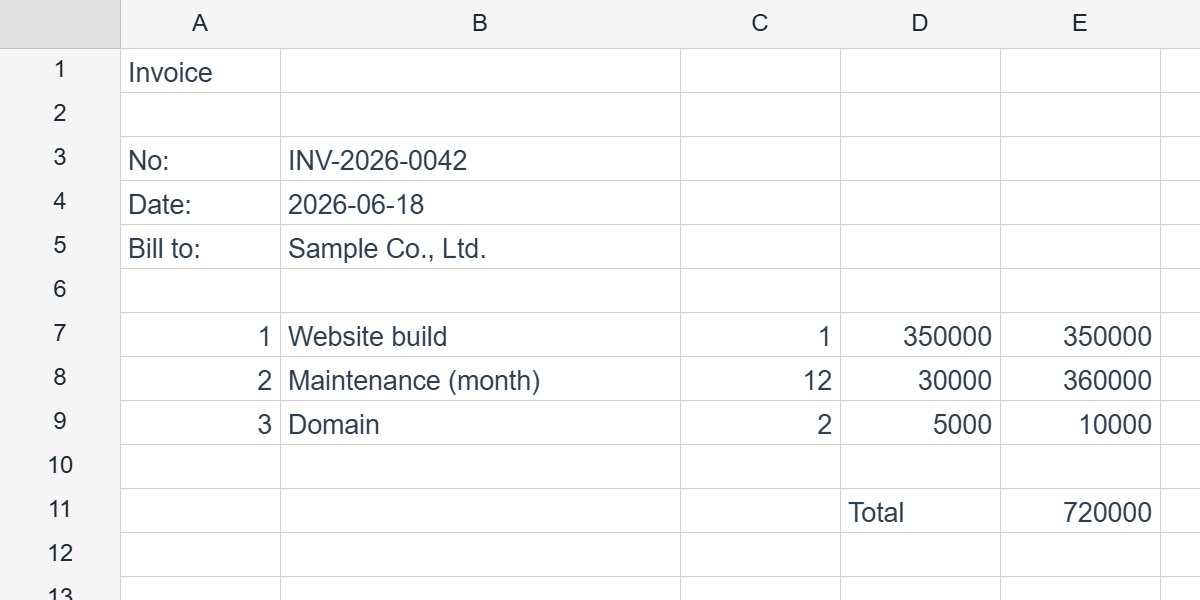
Designing the template
Type literal text and {{token}} cells straight into the grid. Single-token cells keep the bound value’s type (so numbers stay numbers). Two special tokens are available in the detail band: {{#index}} (1-based row number) and {{#count}} (total records).
// Header
ws.cell('A1').setValue('Invoice')
ws.cell('A3').setValue('No:');       ws.cell('B3').setValue('{{invoiceNo}}')
ws.cell('A4').setValue('Date:');     ws.cell('B4').setValue('{{date}}')
ws.cell('A5').setValue('Bill to:');  ws.cell('B5').setValue('{{customer.name}}') // dotted paths ok

// Detail band (one design row, repeated per item)
ws.cell('A7').setValue('{{#index}}')
ws.cell('B7').setValue('{{name}}')
ws.cell('C7').setValue('{{qty}}')
ws.cell('D7').setValue('{{price}}')
ws.cell('E7').setValue('=C7*D7')      // per-row formula — relative refs shift per record

// Footer
ws.cell('D9').setValue('Total')
ws.cell('E9').setValue('=SUM(E7:E7)') // aggregate expands over the materialized detail range
Defining the sections
Describe which 0-based, inclusive design rows belong to each section. Sections are contiguous; a detail section names the array field in the data via source:
ws.defineReportTemplate({
  columns: [0, 4], // A:E — the materialized column range
  sections: [
    { role: 'header', rows: [0, 5] },
    { role: 'detail', rows: [6, 6], source: 'items', pageBreakEvery: 20 },
    { role: 'footer', rows: [7, 9] },
  ],
})
ReportSection
| Field | Type | Applies to | Description |
|---|---|---|---|
role | 'header' | 'detail' | 'footer' | all | Which band this is. |
rows | [top, bottom] | all | 0-based inclusive design-row range. |
source | string | detail | Key into the data (dotted paths allowed) — the array that drives repetition. |
keepTogether | boolean (default true) | detail | Never split one record across a page boundary. |
pageBreakEvery | number | detail | Insert a manual page break after every N materialized records (fixed-form 帳票). |
ReportTemplateSpec is { sections: ReportSection[], columns?: [top, bottom] }.
Binding data
ReportData is a plain object. Top-level fields feed header/footer tokens; array fields (keyed by each detail’s source) feed the repeating band:
ws.bindReport({
  invoiceNo: 'INV-2026-0042',
  date: '2026-06-18',
  customer: { name: 'Sample Co., Ltd.' },
  items: [
    { name: 'Website build',       qty: 1,  price: 350000 },
    { name: 'Maintenance (month)', qty: 12, price: 30000 },
    { name: 'Domain',              qty: 2,  price: 5000 },
  ],
})

// Undo the expansion, restoring the template view
ws.unbindReport()
The detail band expands vertically — rows shift down, columns never move. Per-row formulas relative-shift for each record, and footer aggregates like =SUM(E7:E7) expand to cover the full materialized detail range.
The instance.report handle
The same operations are available on grid.report, scoped to the active sheet:
grid.report.define({ /* ReportTemplateSpec */ })
grid.report.bind({ /* ReportData */ })
grid.report.unbind()
grid.report.get()    // ReportTemplateSpec | null
grid.report.state()  // 'none' | 'template' | 'bound'
Lite-readable equivalents on the worksheet: ws.getReportTemplate() and ws.getReportState().
JSON round-trip
The template is serialized under each sheet’s reportTemplate in ReoGrid JSON, so a designed report can be saved and restored — then bound with fresh data at any time.
Related
- Page Layout — pair
pageBreakEverywith the paging model for fixed-form output. - PDF Export — render the bound report straight to PDF.
- Formula Engine — per-row and aggregate formulas inside bands.