
Cell Comments
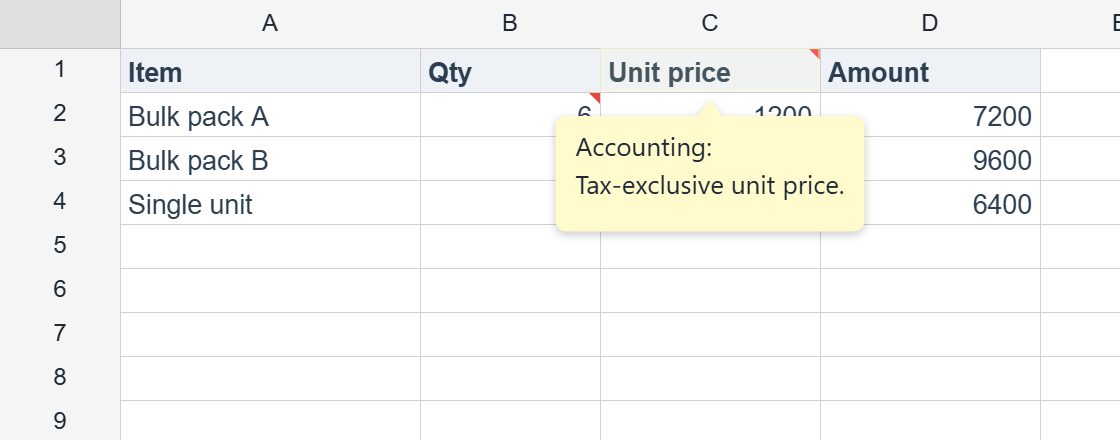
Since v1.4.0 you can attach a comment (a classic Excel “memo/note”) to any cell. Each commented cell shows a red corner marker and reveals a bubble on hover. Comments are single-author notes — threaded replies are intentionally out of scope.
Note: Authoring comments is a Pro feature. Reading comments (
getComment,getComments,hasComment) works in Lite, so comments authored in Pro — or read from xlsx — still surface in the free tier.
Setting a comment
There is one comment per cell. Set it by row/column on the worksheet, or through a cell handle:
import { createReogrid } from '@reogrid/pro'

const grid = createReogrid({ workspace: '#app' })
const ws = grid.worksheet

// By row/column — returns the comment's numeric id
ws.setComment(0, 2, 'Tax-exclusive unit price.', { author: 'Accounting' })

// Via a cell handle
ws.cell('B2').setComment('Bulk discount applies above 4 packs.', { author: 'QA' })
Calling setComment again on the same cell replaces the existing note.
SetCommentOptions
| Option | Type | Description |
|---|---|---|
author | string | Author name (also written to xlsx <authors>). |
visible | boolean | Pin the comment box visible (preserved for round-trip; v1 always shows the marker + hover bubble). |
Reading comments (Lite-readable)
ws.getComment(0, 2)   // CellComment | null
ws.hasComment(0, 2)   // boolean
ws.getComments()      // readonly CellComment[] on the sheet
ws.cell('B2').getComment()
A CellComment is { id, row, col, text, author?, visible? }.
Updating and removing
ws.setCommentVisible(0, 2, true)  // toggle the pinned-visible flag
ws.removeComment(0, 2)            // remove one comment (returns true if removed)
ws.clearComments()                // remove every comment on the sheet
Display
Every commented cell renders a small red triangle in the top-right corner; hovering the cell shows the comment text in a bubble. The visible flag is preserved through I/O for a future always-visible box, but v1 always uses the marker-plus-hover behavior.
Your own comment UI
Since v1.7.1 pressing a cell’s red indicator fires onCommentClick and then selects the cell as usual. Pair it with showCommentBubble: false to replace the built-in hover bubble with your own popup or side panel:
const grid = createReogrid({ workspace: '#grid', showCommentBubble: false });

grid.onCommentClick(({ row, column, comment, clientX, clientY }) => {
  openCommentPopup(comment.text, clientX, clientY);   // your UI
});
The event follows the active sheet, and a merged cell reports its top-left cell. A press on the indicator does not also tick a checkbox or open a list in that cell. Available in both editions — Lite shows comments read from xlsx or authored in Pro.
Persistence: full round-trip
- xlsx: comments round-trip through
.xlsxsince v1.6.0. Export writes the comments part and the legacy VML box Excel expects alongside it, so a note survives a trip through Excel with its text, its author, and whether it is pinned open. There is nothing to call — it happens onsaveAsXlsx. - ReoGrid JSON: comments round-trip fully through ReoGrid JSON.
Before v1.6.0 comments could be read from an xlsx but not written back, so saving a commented workbook silently dropped every note. If you worked around that by persisting to JSON, you no longer need to.
Comments also travel with a sort since v1.6.0: sortRows used to leave them behind on the original rows, so after sorting a note appeared to belong to a different row’s content.
Related
- Cell Tooltip — dynamic, hover-driven hints (distinct from stored comments).
- Cell Data — reading and writing the underlying cell values.
- ReoGrid JSON — the format that preserves comments losslessly.