
Bulk Load from JSON
When you have an array of objects — from a fetch call, a JSON file, or a database query — populate the grid in one pass and rebuild the formula graph only once.
Full example
import { createReogrid } from '@reogrid/lite';

const data = [
  { product: 'Widget',    price:  9.99, qty: 40 },
  { product: 'Gadget',    price: 24.50, qty: 12 },
  { product: 'Gizmo',     price: 39.00, qty:  7 },
  // ...hundreds more
];

const { worksheet } = createReogrid('#grid');

const columns: { key: keyof typeof data[0]; label: string; format?: string }[] = [
  { key: 'product', label: 'Product' },
  { key: 'price',   label: 'Price',    format: '$#,##0.00' },
  { key: 'qty',     label: 'Quantity' },
];

// 1. Write the header
columns.forEach((col, c) => {
  worksheet.cell(0, c).setValue(col.label).setStyle({ bold: true, backgroundColor: '#f1f5f9' });
});

// 2. Write all data rows — skipFormula defers formula propagation
data.forEach((row, r) => {
  columns.forEach((col, c) => {
    worksheet.setCellInput(r + 1, c, String(row[col.key]), { skipFormula: true });
  });
});

// 3. Apply column formats once
columns.forEach((col, c) => {
  if (col.format) {
    worksheet.range(1, c, data.length, c).setFormat(col.format);
  }
});

// 4. Rebuild the formula graph once at the end — required after skipFormula writes
worksheet.rebuildFormulas();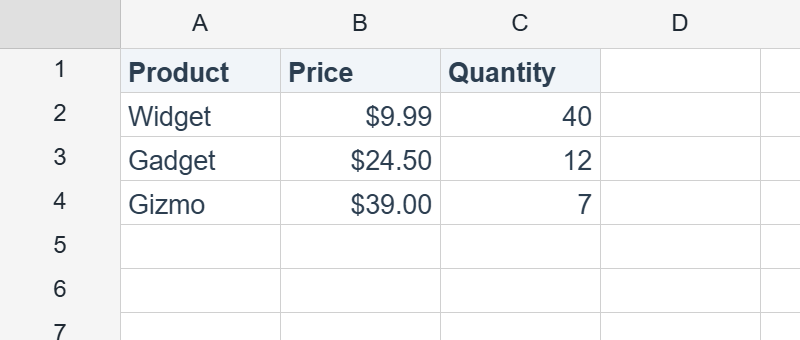
Why rebuildFormulas() at the end?
A plain setCellInput re-evaluates dependents immediately. When you’re loading 10,000 cells, that’s 10,000 graph walks. Passing { skipFormula: true } defers that work, and one rebuildFormulas() after all writes restores a consistent formula graph — an order of magnitude faster for large bulk loads. (worksheet.bulkSetCells() wraps this same pattern in a single call.)
If the sheet contains no formulas at all, you can skip both skipFormula and step 4 entirely.
Performance tips
- Avoid per-cell
setStylein a hot loop. Apply styles to ranges:worksheet.range('A1:C1').setStyle({ bold: true }). - Size columns up front, not per-cell:
worksheet.column(0).width = 200. - Set
rows.setCount()to preallocate the row count if you know it:worksheet.rows.setCount(data.length + 1);
Lite tier limit
Lite caps at 100 rows × 26 columns. Writes beyond those limits are silently ignored. For larger datasets, use @reogrid/pro.
See also
Sorry to hear that. What could be improved?